
If some Windows functions aren’t working or Windows crashes, use the System File Checker to scan Windows and restore your files.
Category Archives: Tips & Tricks
Repairing or removing Internet Explorer 11 in Windows 10
IE11 can be disabled and enabled from the ‘Turn Windows features on or off’ link from the control panel. To repair IE11 firstly disable it and then run ‘sfc /scannow’ from a command prompt window, before re-enabling.
Verifying Windows Version
Press the Windows Key and ‘R’ to open the run dialogue.
Type ‘winver‘ and press enter.

Revitalizing old PCs
When your old PC will not run Windows 10 or Windows 7 comfortably, perhaps because it was originally XP, then there is a good chance that it will be able to do useful work with a fresh installation of one of the ‘flavours’ of the Linux operating system .
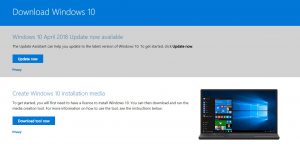
Windows 10 Update Assistant and Media Creation Tool
If you need to create Windows 10 installation media – DVD or USB drive or you need help with an update go to this Microsoft web-page.
Apple iCloud App Specific Passwords for Email
When your apple email password doesn’t work when adding an account to a non-apple third-party devices and apps.
You need to use an App Specific Password which you can generate from your Apple ID Account Page
Read more: Link to Apple Support
Microsoft Windows Tool to Fix Install and Uninstall issues
Fix problems that block programs from being installed or removed
- Corrupted registry keys on 64-bit operating systems
- Corrupted registry keys that control the update data
- Problems that prevent new programs from being installed
- Problems that prevent existing programs from being completely uninstalled or updated
- Problems that block you from uninstalling a program through Add or Remove Programs (or Programs and Features) in Control Panel
Sage Payroll Reinstallation Update Problem – Tip – Solution
When you run the sage payroll installer on a pc that already has or had a previous version installed you will hit the dialogue picker which invites you to choose which installation you wish to update. This might be what you require – if not then there is no obvious method to force a ‘fresh’ installation ignoring whatever happened before, and you might even have a dialogue asking you to choose from an empty [unpopulated] list – you are unable to proceed.
After uninstalling the application and then deleting the program folders etc attempting to by-pass this problem the really critical tip is to look in ‘C:\Windows’.
If there is a ‘Payroll.ini’ file rename/delete it or move it somewhere else if you are cautious.
Obviously take care and back-up data and/or the system if you are working on a live installation.